Everything Before
You Press Play.
Bring PreSpin your tracks and it gets every one analyzed, cued, tagged, and filed — ready the moment you step up to the decks.
We do the prep. You play where you already play — Serato, rekordbox, your decks.
Free during the closed beta · macOS (Apple Silicon)
The grind
The part nobody has time for.
You found the tracks. Now comes the rest — checking the grid, setting cues, fixing tags, sorting each one into the right crate. It's the work that turns a download into something you can trust at the decks. It's also the work that quietly eats your night.
Found It
the fun part
PreSpin handles it
analyze · cue · tag · file
Ready to Play
Serato · rekordbox · decks
Reviewing the tracks you found
60–90 min of busywork
15–20 min with PreSpin
PreSpin does the heavy lifting — you review the results and fine-tune what matters.
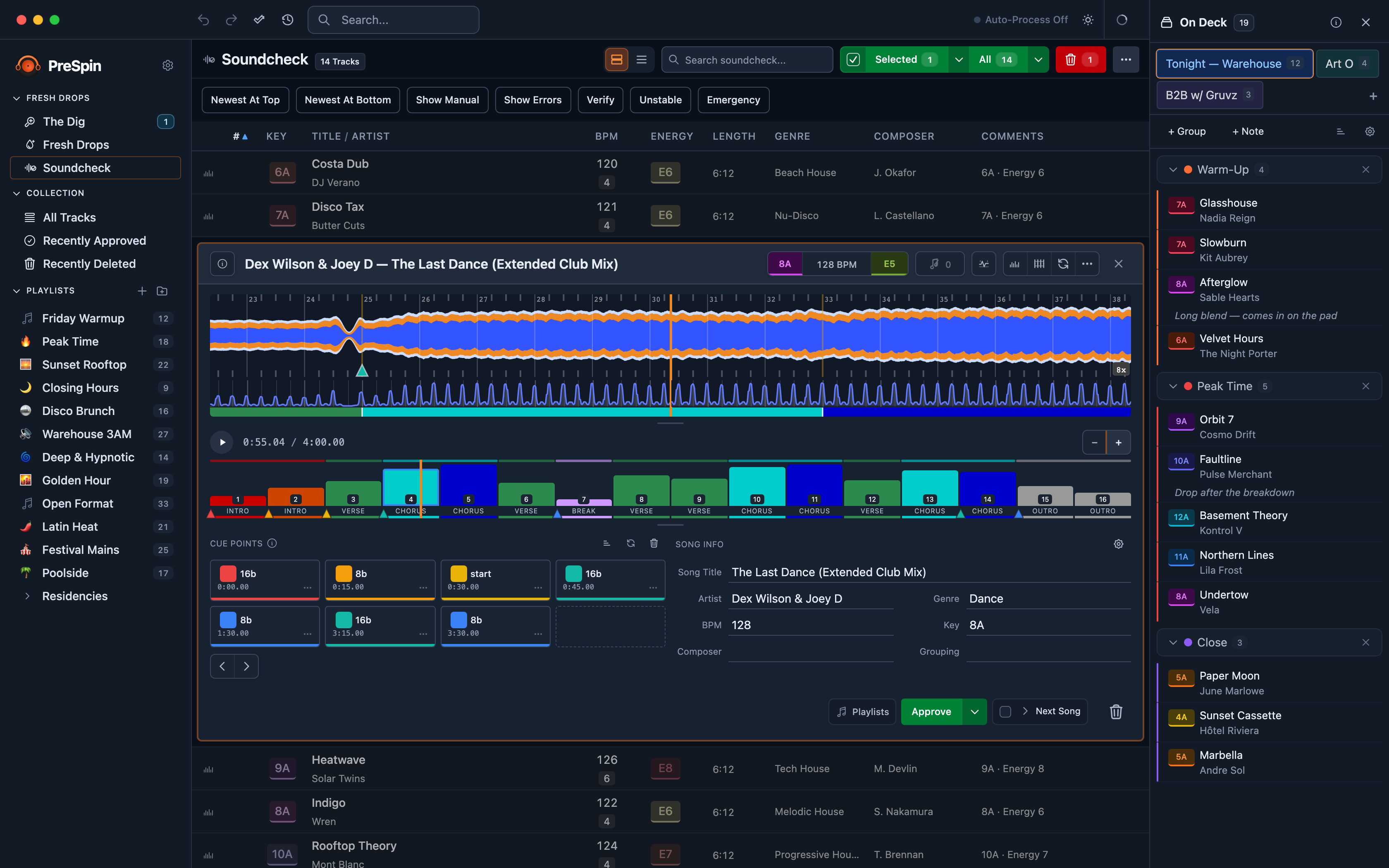
Review the analysis, approve the cues, and line up tonight's set — all on one screen.
- One Pass
- beats, energy, structure, key & loudness
- ~15–20s
- a track, on Apple Silicon
- 100% Local
- your audio never leaves your Mac
- Undo Anything
- cue edits, file moves, settings
How it works
One path, every track.
Every track follows the same line — analyzed, cued, filed, ready. The Dig is an optional on-ramp; skip it and just drop tracks in. PreSpin carries each one through, then hands off to where you actually spin.
PreSpin isn't a player. It's everything that happens before you press play — and the last step is always yours.
Hear It, Grab It
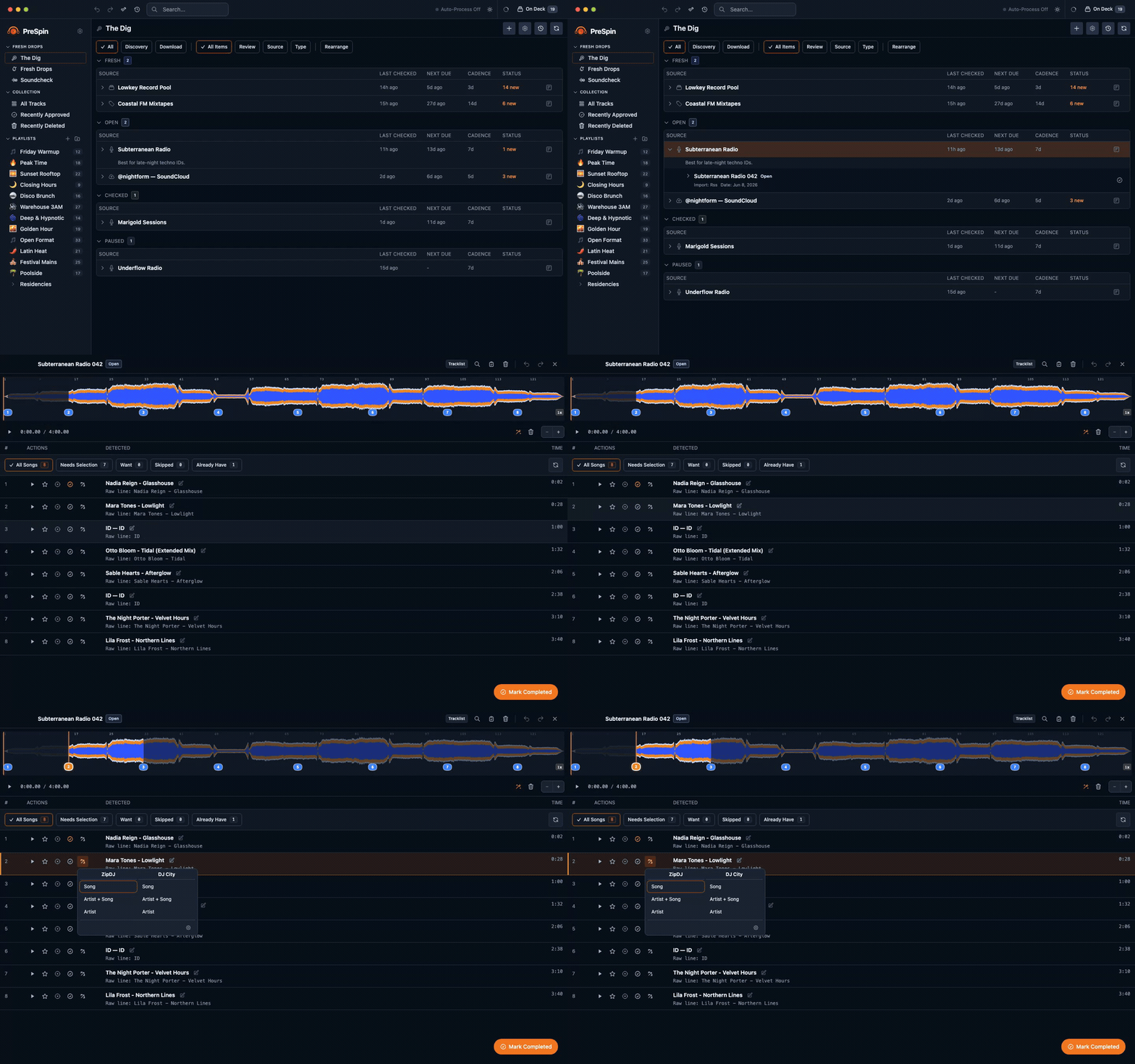
The rest of PreSpin works on whatever tracks you bring it. The Dig is the optional front end — point it at the podcasts, record pools, and SoundCloud sets you already follow, and new music comes to you instead of you chasing it. It checks them on a cadence you set, and flags the tracks you already own, so you only grab what's new.
- Set a cadence.Daily or weekly — The Dig checks your sources so you don't have to.
- Already in your library? It tells you, so you never download the same track twice.
New Music, Analyzed and Ready
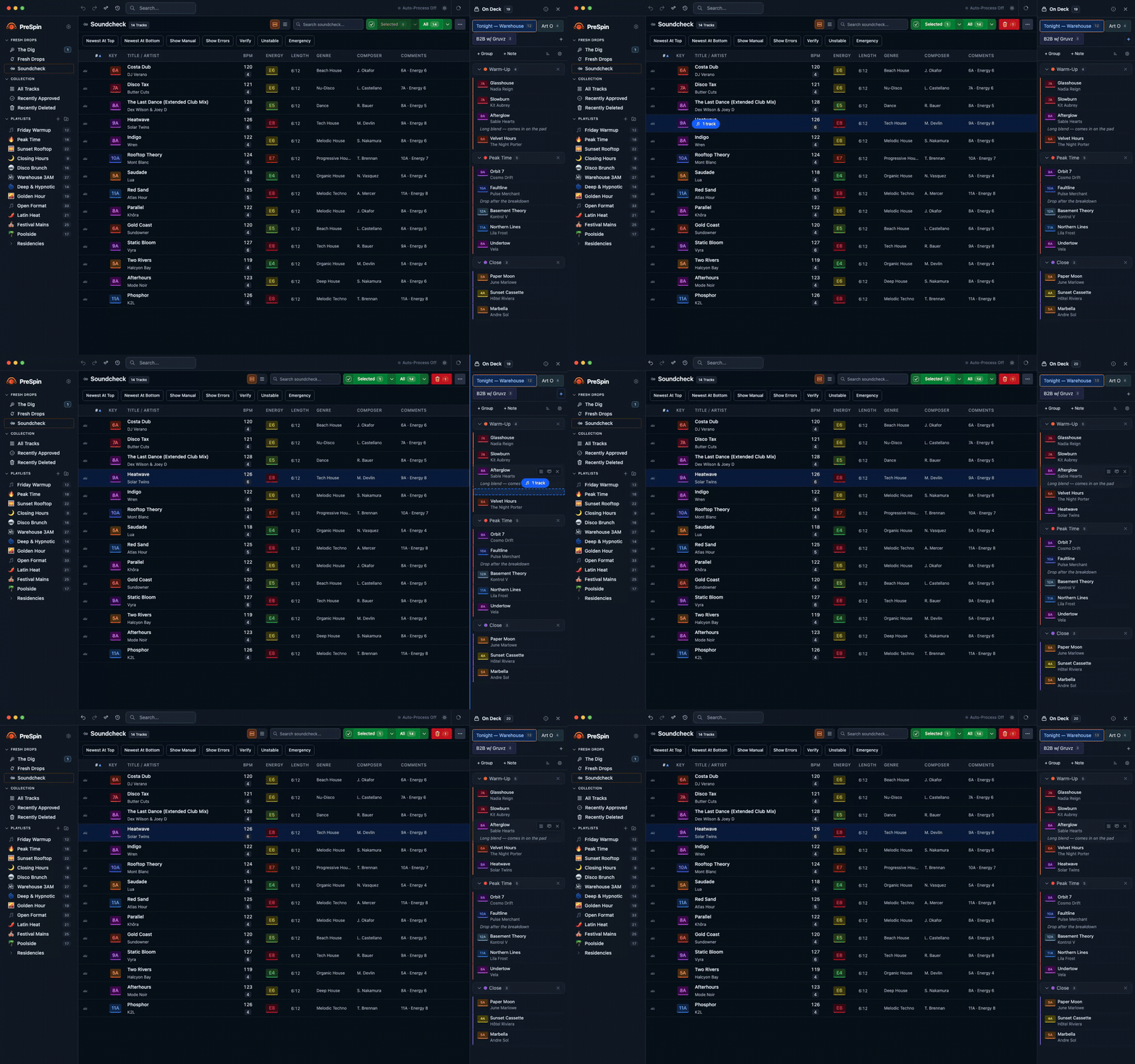
Fresh Drops catches downloads the moment they land. Turn on Autopilot and PreSpin analyzes each one — beats, energy, structure, key, loudness — and builds a full Mix Map. Then Soundcheck gives you one clean place to glance, nudge a cue, and send it on.
- Autopilot runs the analysis hands-off, in the background, while you keep digging.
- Cue points in your style— Soundcheck learns from the files you've already set up.
Stage Tracks As You Dig
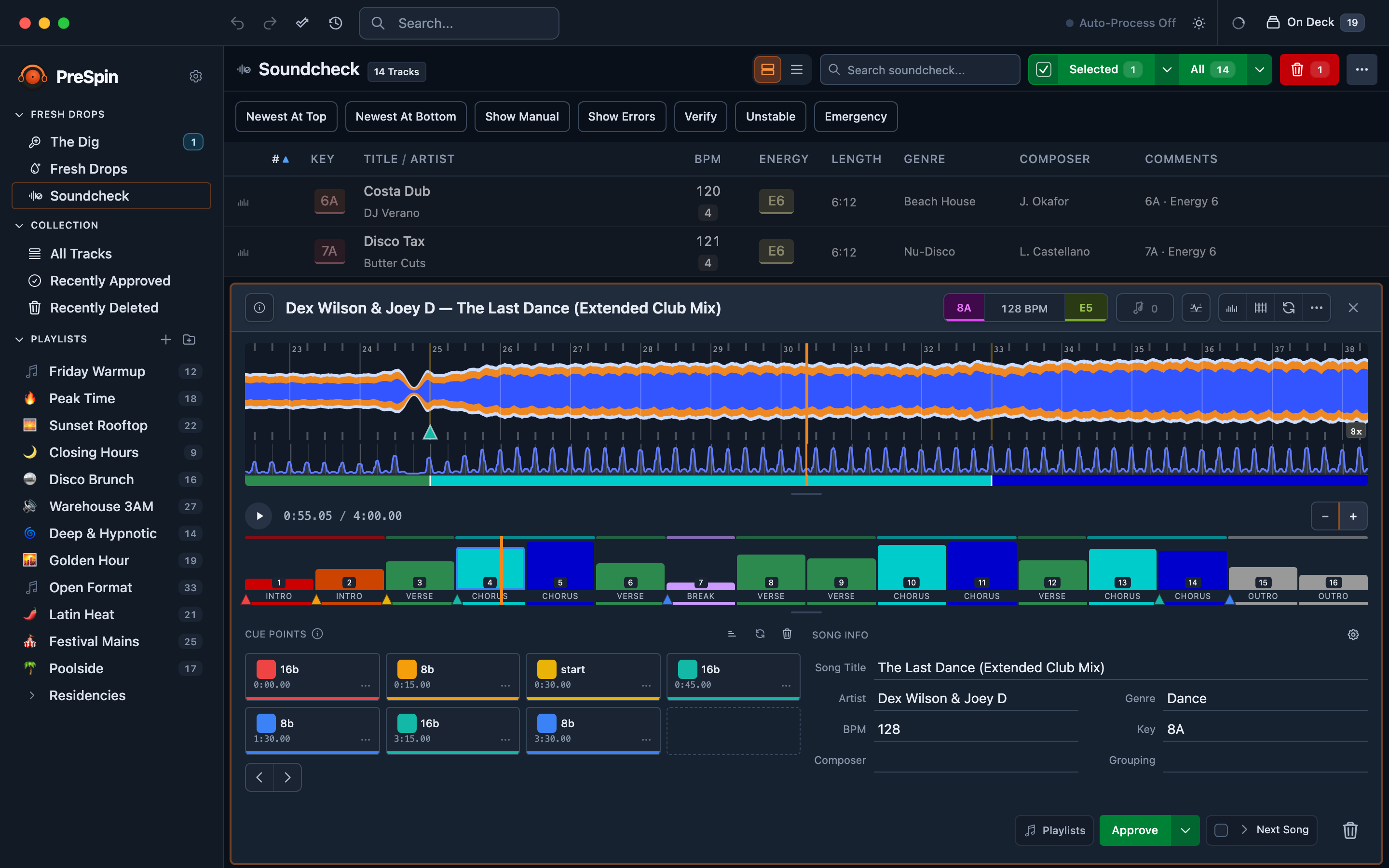
On Deck is a staging list that follows you across every page. Drag a fresh track straight out of Soundcheck, build tonight's list as you go, then send it to a playlist in one move — without losing your place.
Sorted, Filed, and Ready to Go
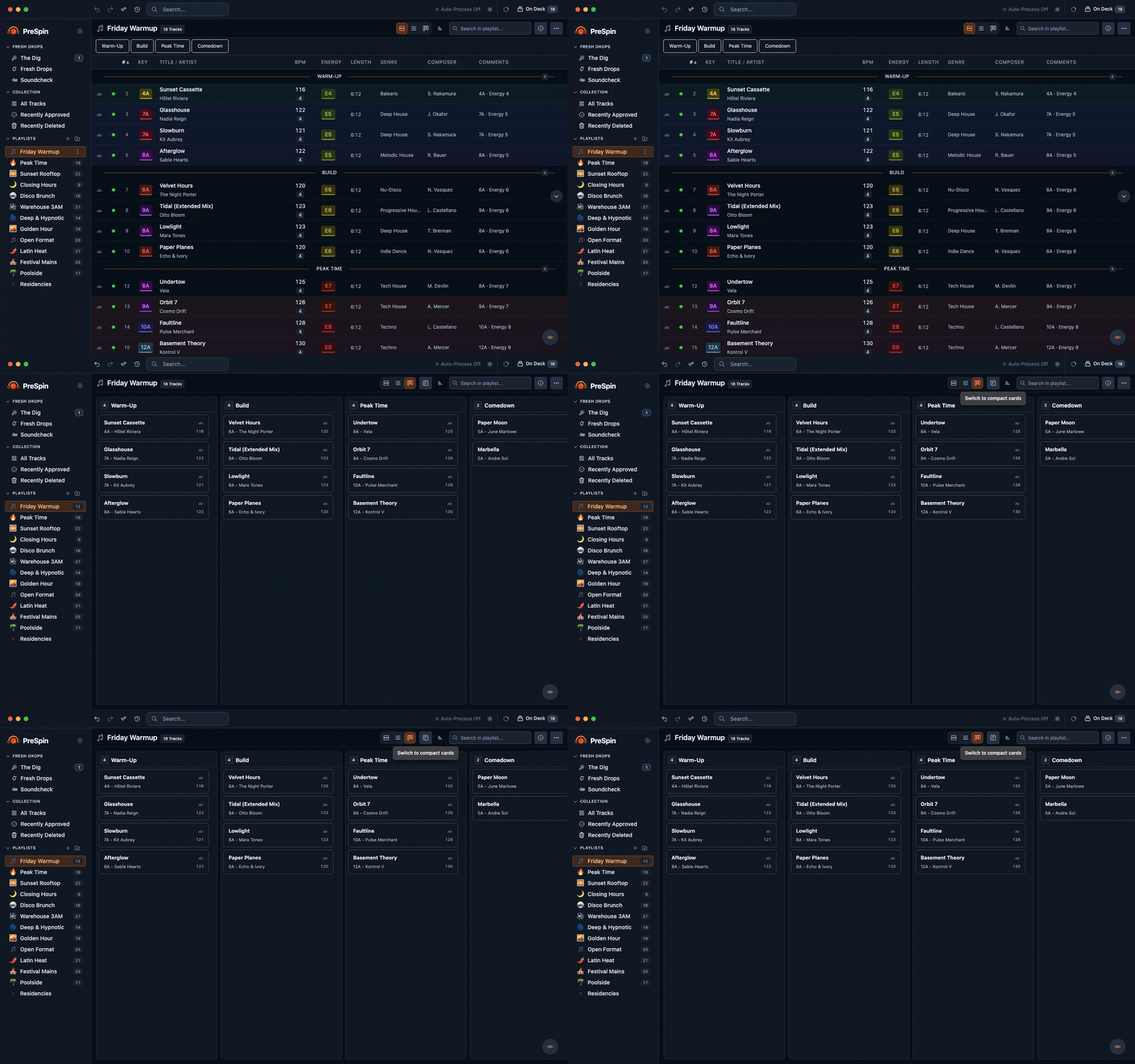
Everything lands in one library — playlists, crates, and smart rules. Block out a night with Mini Sets — warm-up, build, peak — then flip the whole playlist from a list to a board when you'd rather see its shape.
- Mini Sets carve a playlist into the parts of your night, then reflow from a list to a board with one click.
- Camelot sort lines up key and BPM so the next track always fits.
- Smart playlists fill themselves from rules you set — fresh imports land in the right crate on their own.
Your library, your rules
We work on your files.
So we built it to never lose them.
PreSpin writes to your real library. That meant building safety in from the start — not adding it later.
See exactly what we read and writeLocal By Default
Analysis runs on your Mac. Your music isn't uploaded to be analyzed — nothing leaves your machine unless you ask it to.
Originals, Protected
The first time PreSpin touches a file, it tucks the original into a protected vault. One click restores it, exactly as it was.
You Decide What We Write
PreSpin writes its analysis — BPM, key, energy, and cue points — into your files' tags, and never alters your original audio (edits always create copies). Writing into Serato's or rekordbox's own libraries is opt-in: turn it on and PreSpin backs everything up first, and always keeps your original.
Encrypted Cloud BackupOptional
Want an off-site copy? Cloud Backup encrypts everything on your Mac first, using modern, well-tested encryption — and the key to unlock it never leaves your device. We only ever store data we can't read.
Under the Hood
The engine under every track.
The analysis and library work that runs beneath every track you prep — quiet, consistent, and yours to fine-tune.
- 01
One-Pass Analysis
Beats, energy, structure, key, and loudness in a single pass. No bouncing between apps.
- 02
Cue Points In Your Style
PreSpin learns your cue placement from your existing files and matches it on every new track.
- 03
Mix Map + Waveform
A zoomable waveform with beat-snap and a color-coded map of every section, from intro to outro.
- 04
Clean Tags, Smart Renaming
Tidy ID3 tags and consistent filenames. Compatible with Serato DJ Pro and rekordbox 6/7.
- 05
Drop A Folder, Keep Working
Drop a folder and keep searching. PreSpin analyzes, cues, and tags every new track in the background — nothing to watch, nothing to approve until you're ready.
- 06
Keep Tracks On Deck
A staging list that follows you across every page. Drag tracks in from Soundcheck or the library, then send them to a playlist in one move.
Questions
Short answers to what people ask most.
Do I play my sets from PreSpin?
No — PreSpin is prep, not performance. It gets every track analyzed, cued, and organized, then your library opens in Serato, rekordbox, or on your decks exactly as you set it up. You play where you already play.
Is my music uploaded anywhere?
No. Analysis runs on your Mac and your audio never leaves it. If you turn on Cloud Backup, PreSpin encrypts everything on your machine first and stores only ciphertext — we can't read your library.
Why macOS first?
Most working DJs we know are on Mac. Starting macOS-only let us focus on getting analysis, cues, and library handling right before splitting effort across two platforms. The codebase is structured to port to Windows when the demand and the maintenance budget justify it.
Closed beta · macOS
Request early access.
PreSpin is in closed beta on macOS. Tell us about your setup — strong asks move up the list.